For agent builders

Get invited into the apps your users already use.

IDhen gives your agent sanctioned, reliable access to your users’ accounts, with no passwords or 2FA codes to handle and no scrapers breaking on login. One integration reaches every app on IDhen. Users approve in a familiar flow inside the app, and you get a scoped, time-limited token plus revocation events.

An app’s agent picker listing verified agents a person can invite

The problem

Getting into your users’ accounts is the hard part.

Your agent is only as useful as the accounts it can reach. Today that usually means a password, a relayed code or a browser you hope keeps working.

Holding credentials is a risk.

Storing passwords and passing along 2FA codes makes you a target, and one leak hurts every user who trusted you.

  • Compromised credentials were a way in for 22% of the breaches Verizon reviewed. Verizon
  • 41% of successful logins Cloudflare observed used a password already leaked elsewhere. Cloudflare

Scrapers break and get blocked.

A redesigned login page, a new CAPTCHA or a bot rule stops your agent mid-task, and your users feel it.

  • A bank moves its password field to a second screen, and every overnight run fails at the same step.
  • Financial services drew 46% of account takeover incidents in 2025. Imperva

Every app is its own project.

Each app means a separate integration to build and keep alive, if the app will work with you at all.

  • Ten apps your users care about means ten login flows, ten 2FA quirks and ten things that break on their own schedule.

Building your own connectors?

Plenty of agent teams start by wiring up each app themselves, or plan to. One app is doable. Every app adds the same list again:

  • Get the user’s permission in a way the app will accept
  • Handle each app’s login and 2FA without holding passwords
  • Keep scopes, expiry and revocation straight per app
  • Fix it every time an app changes

IDhen gives you one way to connect to every app that supports it, so your team can stay on the agent.

Already working on it? Talk to us about running IDhen beside them.

How it works

Three steps to get in the front door.

  1. Register and get verified.

    Tell IDhen who you are and what your agent does. Verified agents show who makes them in the app’s picker, so users know it’s you.

  2. Your user invites you.

    Inside an app they already use, your user taps “Invite your agent,” picks you and approves what you can do and for how long. You can suggest a length; the app sets the cap and the user decides.

  3. Act within the token.

    You get a scoped token that lasts as long as the user chose, from this session to ongoing, within the app’s limits. If the user removes access, you get a revocation event and the token stops working.

Illustrative sketch
idhen.on("grant", async (g) => {
  // g.app, g.scopes, g.duration, g.expiresAt
  // expiresAt is null when access is ongoing
  await saveToken(g.user, g.token);
});

idhen.on("revoke", async (r) => {
  await dropToken(r.user, r.app);
});

Not a live SDK. The API is being shaped with early partners.

Why it works

A pattern people already trust.

Sign in with Google and Apple taught people to log in through an account they already trust. PayPal did the same for payments, so a store never sees your card number. More recently, Plaid made linking an app to a bank account routine. Each time, one familiar consent step replaced a pile of one-off setups. IDhen brings the same model to agents and the apps they work in.

For your engineering team

One integration reaches every app that supports IDhen, the way Plaid gave fintech teams one integration instead of one per bank. No scrapers or per-app logins to keep alive.

For your users

They connect you from inside an app they already trust, through a consent step they have seen before. No passwords to hand over.

The user’s side

What your users see.

Your user connects you from inside an app they already use.

1

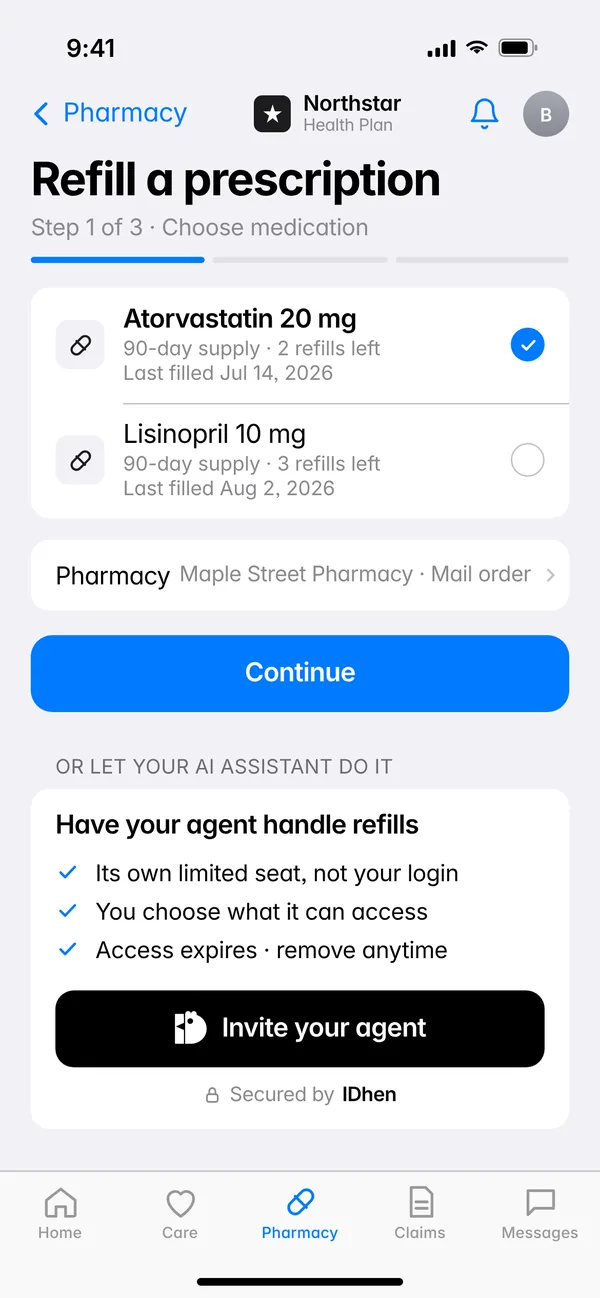
Tap “Invite your agent.”

Users find you inside apps they already trust. The same button works in every app on IDhen, so you build one flow instead of an integration per app.

The “Invite your agent” button on a prescription refill screen
2

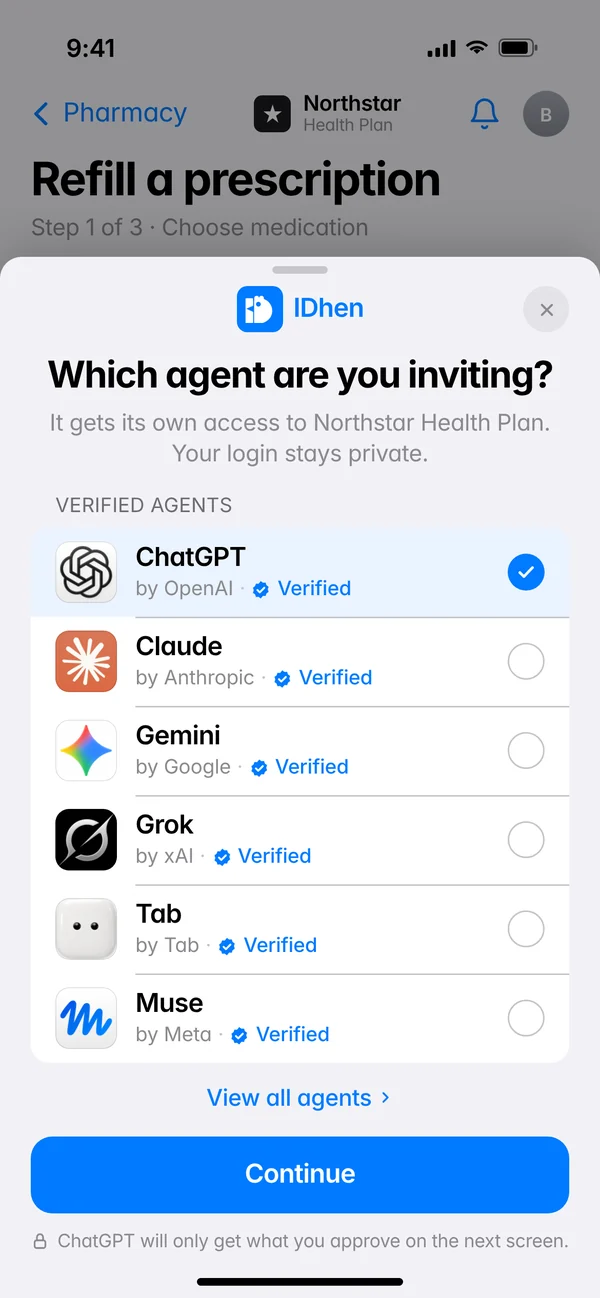
Pick your agent.

Verified agents show who makes them, so users know it’s really you.

A sheet asking which agent you are inviting, with ChatGPT selected and Continue below
3

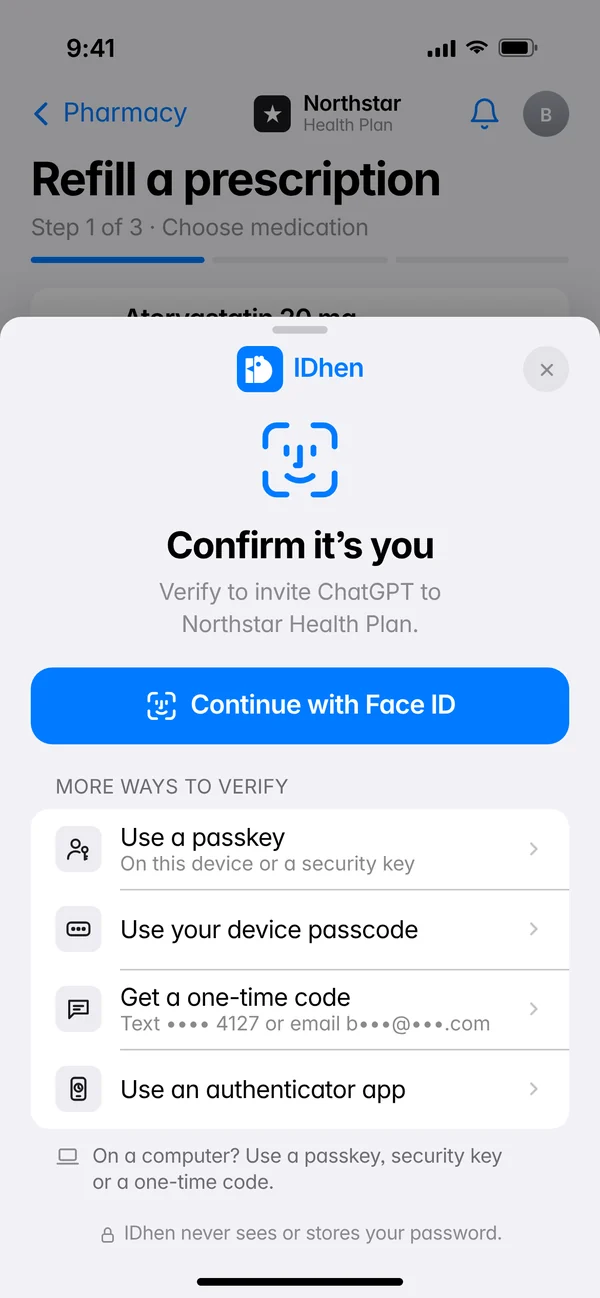
Confirm it’s you.

Your user proves it’s them, right there in the app. You never hold their password or relay a 2FA code.

A sheet asking you to confirm it’s you with Face ID, a passkey, your device passcode, a one-time code or an authenticator app
4

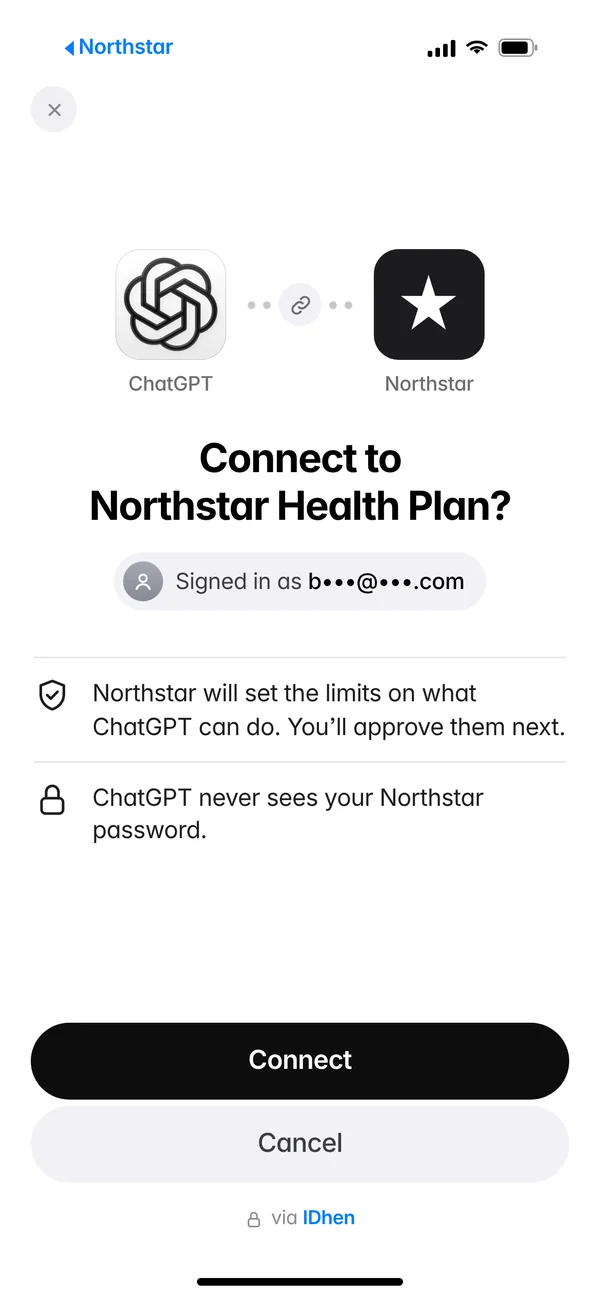
Link your agent.

This screen is yours. The user confirms which account on your side gets access, so the grant lands in the right place.

ChatGPT asking to connect to Northstar Health Plan, signed in as a masked email, with Connect or Cancel
5

Decide exactly what it can do.

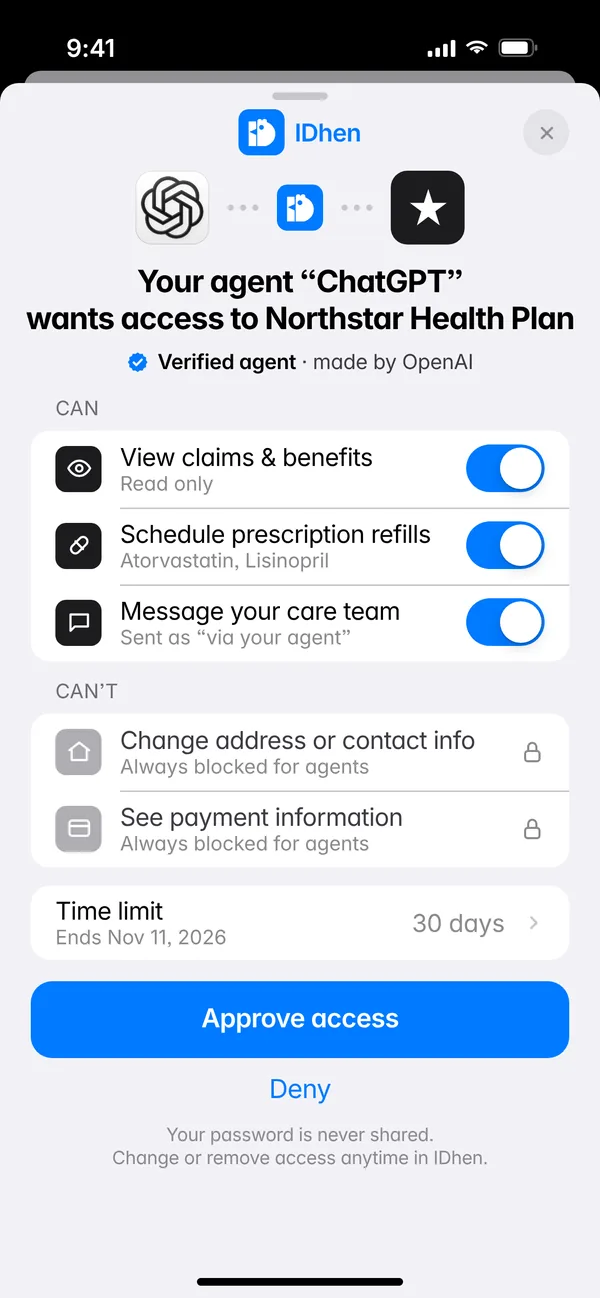
Users see a consent screen from an app they know, which is an easier yes. You can suggest how long access lasts; the app sets the cap and the user decides.

The IDhen consent sheet with allowed and blocked permissions, a 30-day limit and Approve or Deny
6

Connected. Now your agent can act.

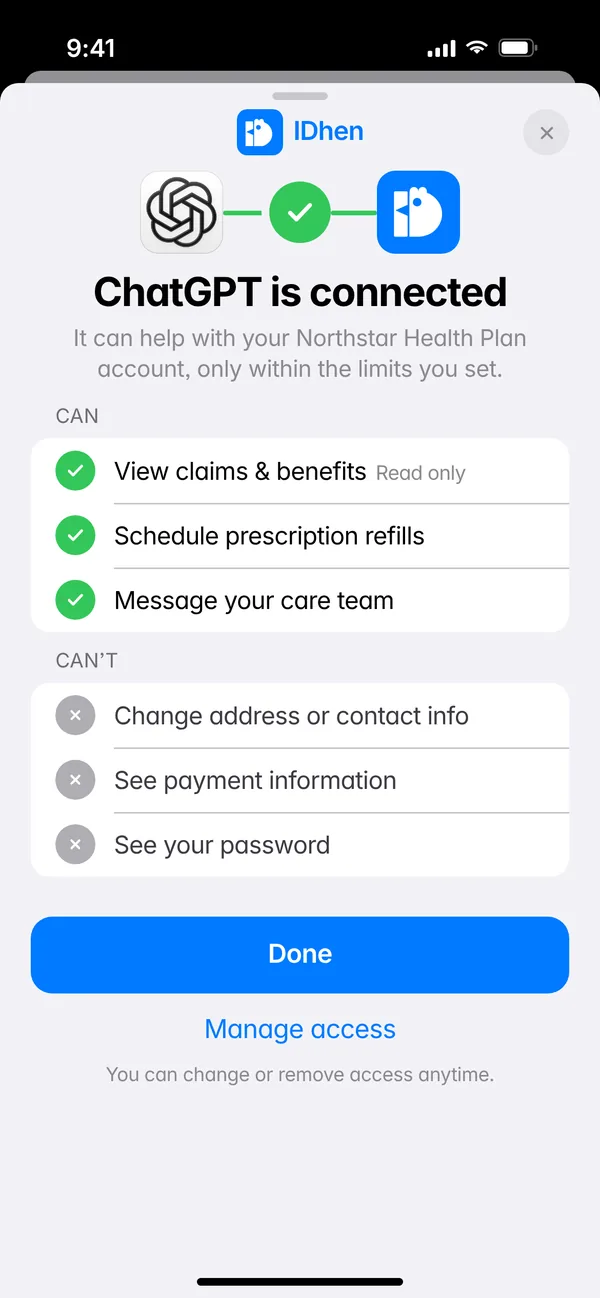
You hold scoped, revocable access to real account actions, like checking a claim or scheduling a refill, for as long as the user allowed. No password to store, and no scraper to break when the login page changes.

A success sheet saying ChatGPT is connected, with what it can and can’t do and when access expires
Try the interactive demo →Click through the whole flow yourself.

FAQ

Questions from agent teams

How does my agent get verified?

You register your agent with IDhen and we check who makes it. In the app’s picker, users see your agent as verified, along with the company behind it.

Which apps can my agent reach?

Any app that adds IDhen. We’re starting with health plans, banks and utilities, where people already want help from an agent. Your one integration covers each new app as it joins.

What happens when a user removes access?

Your token stops working right away and you get a revocation event, so you can stop any work in progress and let the user know.

Do we ever see the user’s password?

No. The user confirms it’s them with the app and IDhen. You only ever get a scoped token, never a password or a 2FA code.